Condition Builder
Build conditions visually to determine when rules apply. Conditions evaluate entity data against criteria you define.
Structure
Simple Condition: field operator value
- Example:
orderTotal > 1000
Group Condition: Combine multiple conditions with AND/OR
- AND: All must be true
- OR: At least one must be true
- Can be nested up to 10 levels
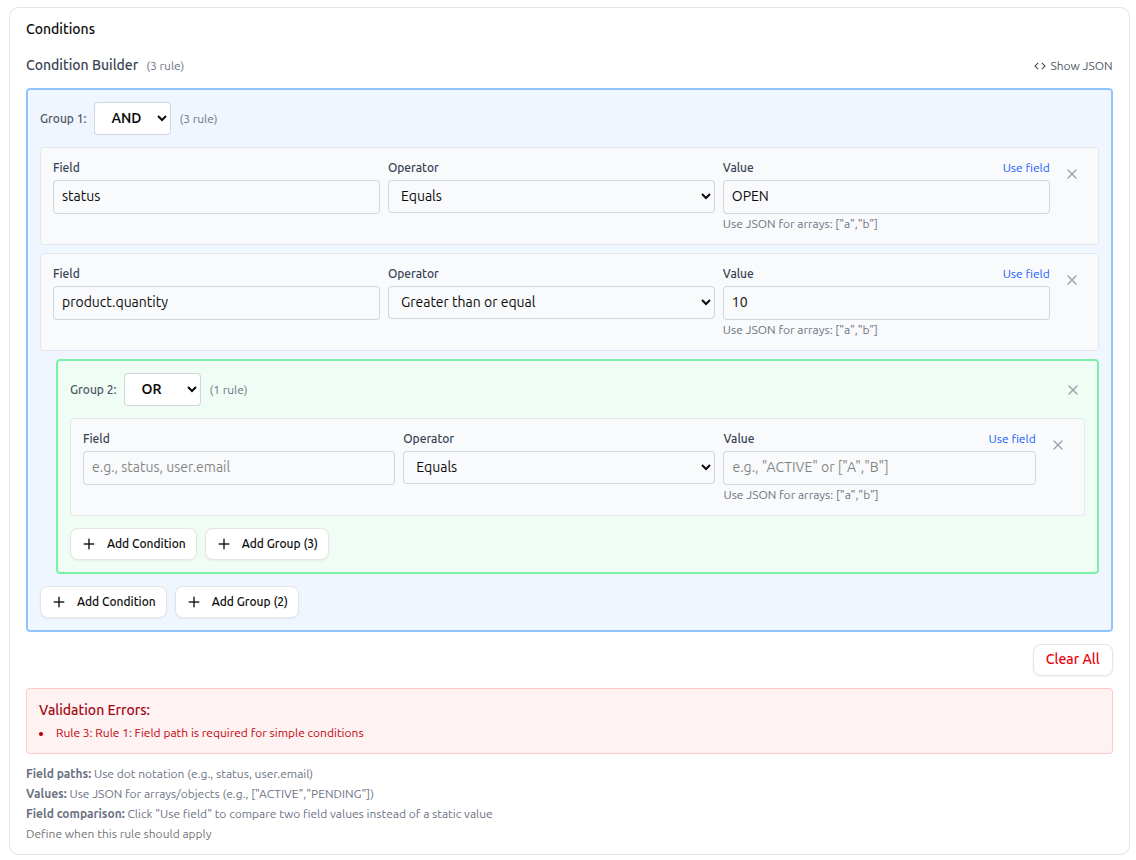 Condition builder showing simple conditions and nested AND/OR groups
AND:
  - status = "PENDING"
  - orderTotal > 5000
  OR:
    - customerTier = "GOLD"
    - customerTier = "PLATINUM"
Field Paths
Use dot notation to access data:
- Top-level:
status,quantity - Nested:
user.email,address.city - Arrays:
items[0].productId,tags[2](zero-based)
Invalid paths show error indicators.
Operators
| Operator | Description | Example |
|---|---|---|
=, == | Equals | status = "ACTIVE" |
!= | Not equals | status != "DELETED" |
>, >=, <, <= | Comparison | orderTotal > 1000 |
IN | In list | status IN ["ACTIVE", "PENDING"] |
NOT_IN | Not in list | status NOT_IN ["DELETED"] |
CONTAINS | Array contains | tags CONTAINS "urgent" |
NOT_CONTAINS | Array not contains | tags NOT_CONTAINS "archived" |
STARTS_WITH | String prefix | email STARTS_WITH "admin" |
ENDS_WITH | String suffix | filename ENDS_WITH ".pdf" |
MATCHES | Regex match | phone MATCHES "^\\+1" |
IS_EMPTY | Null/empty check | description IS_EMPTY |
IS_NOT_EMPTY | Has value | assignedTo IS_NOT_EMPTY |
Values
Static Values
- Strings:
"ACTIVE","john@example.com" - Numbers:
1000,3.14 - Booleans:
true,false - Arrays:
["ACTIVE", "PENDING"](for IN/NOT_IN) - Objects:
{"min": 10, "max": 100}
Dynamic Values
{{today}},{{now}},{{yesterday}},{{tomorrow}}{{user.id}},{{user.email}},{{user.name}}{{entity.id}},{{entity.tenantId}},{{entity.organizationId}}
Examples:
expiryDate < {{today}}
createdBy = {{user.id}}
deadline <= {{tomorrow}}
Field Comparisons
Compare two fields instead of field to value. Click "Use field" to toggle.
plannedEndDate < actualEndDate
Building Conditions
- Click Add First Condition
- Enter field path (e.g.,
status) - Select operator
- Enter value or toggle to field comparison
- Add more conditions with Add Condition
- Create nested logic with Add Group
- Toggle AND/OR on groups
- Reorder with arrow buttons
- Delete with trash icon
Validation: System checks field paths, operators, and value formats automatically.
JSON Preview
Click Show JSON to view/debug the raw condition structure.
Common Patterns
Range Check:
AND: quantity >= 10, quantity <= 100
Multiple Options:
status IN ["ACTIVE", "PENDING", "APPROVED"]
Exclusion:
status NOT_IN ["DELETED", "ARCHIVED"]
Date Range:
AND: createdAt >= {{2024-01-01}}, createdAt < {{2024-12-31}}
Required Fields:
AND: firstName IS_NOT_EMPTY, lastName IS_NOT_EMPTY, email IS_NOT_EMPTY
Complex Logic:
AND:
  - orderType = "WHOLESALE"
  - orderTotal > 10000
  OR:
    AND: customerTier = "GOLD", accountAge > 365
    - customerTier = "PLATINUM"
Best Practices
- Start simple, add complexity only when needed
- Use descriptive field paths
- Test boundary values
- Document complex logic in rule description
- Keep nesting depth reasonable (avoid 10+ levels)
- Validate field paths exist on entities
- Use dynamic values (
{{today}},{{user.id}}) where applicable
Troubleshooting
| Issue | Check |
|---|---|
| Always true/false | Field paths, value types, operators, AND/OR logic |
| Evaluation errors | Execution logs, field path validity, JSON syntax, regex patterns |
| Case sensitivity | Strings are case-sensitive |
Next Steps
- Actions Guide - Configure actions based on condition results
- Execution Logs - Debug condition evaluation