Action Builder
Actions execute based on condition results:
- Success Actions - When conditions are true
- Failure Actions - When conditions are false
Action Types
| Action | Purpose | Configuration | Example |
|---|---|---|---|
| ALLOW_TRANSITION | Allow state transition (GUARD rules) | None | Allow work order release |
| BLOCK_TRANSITION | Block transition + error message | message | "Materials not available" |
| LOG | Write to execution logs | level (info/warn/error/debug), message | "Order {{orderId}} approved" |
| SHOW_ERROR | Display error to user | message | "Exceeds credit limit" |
| SHOW_WARNING | Display warning to user | message | "Below minimum quantity" |
| SHOW_INFO | Display info to user | message | "Submitted for approval" |
| NOTIFY | Send notifications | recipients, message | Recipients: manager@co.com |
| SET_FIELD | Update entity field | field, value | field: status, value: "APPROVED" |
| CALL_WEBHOOK | HTTP request to external URL | url, method, payload | POST https://api.example.com |
| EMIT_EVENT | Emit domain event | eventName, payload | Event: order.approved |
💡 GUARD rules: Use BLOCK_TRANSITION as failure action to prevent operations.
Message Interpolation
Use {{field}} syntax for dynamic values:
- Basic:
"Order {{orderId}} assigned to {{assignedTo}}" - Nested:
"Customer {{customer.name}} from {{customer.address.city}}" - Special:
"Approved by {{user.email}} on {{today}}" - Multiple:
"Order {{orderId}} total {{total}} exceeds {{threshold}}"
Success vs. Failure Actions
Success (conditions true):
- Log operations
- Send confirmations
- Set field values
- Trigger processes
Failure (conditions false):
- Block operations (GUARD)
- Display validation errors
- Log rejections
- Notify about failures
Example:
Conditions: orderTotal > 10000
Success: SET_FIELD status="PENDING_APPROVAL", NOTIFY approver
Failure: SHOW_INFO "No approval needed"
Action Sequencing
Actions execute top-to-bottom. Use arrow buttons to reorder.
Order matters:
- Blocking actions stop further execution
- Early field values available to later actions
- Place logs before external calls
Example: LOG → SET_FIELD → SHOW_INFO → NOTIFY → EMIT_EVENT
Building Actions
- Click Add Action in Success/Failure section
- Select action type
- Fill configuration fields
- Use arrow buttons to reorder
- Click trash icon to delete
- Click Show JSON to view raw structure
Validation: System checks required fields, field paths, URLs, JSON syntax, and interpolation.
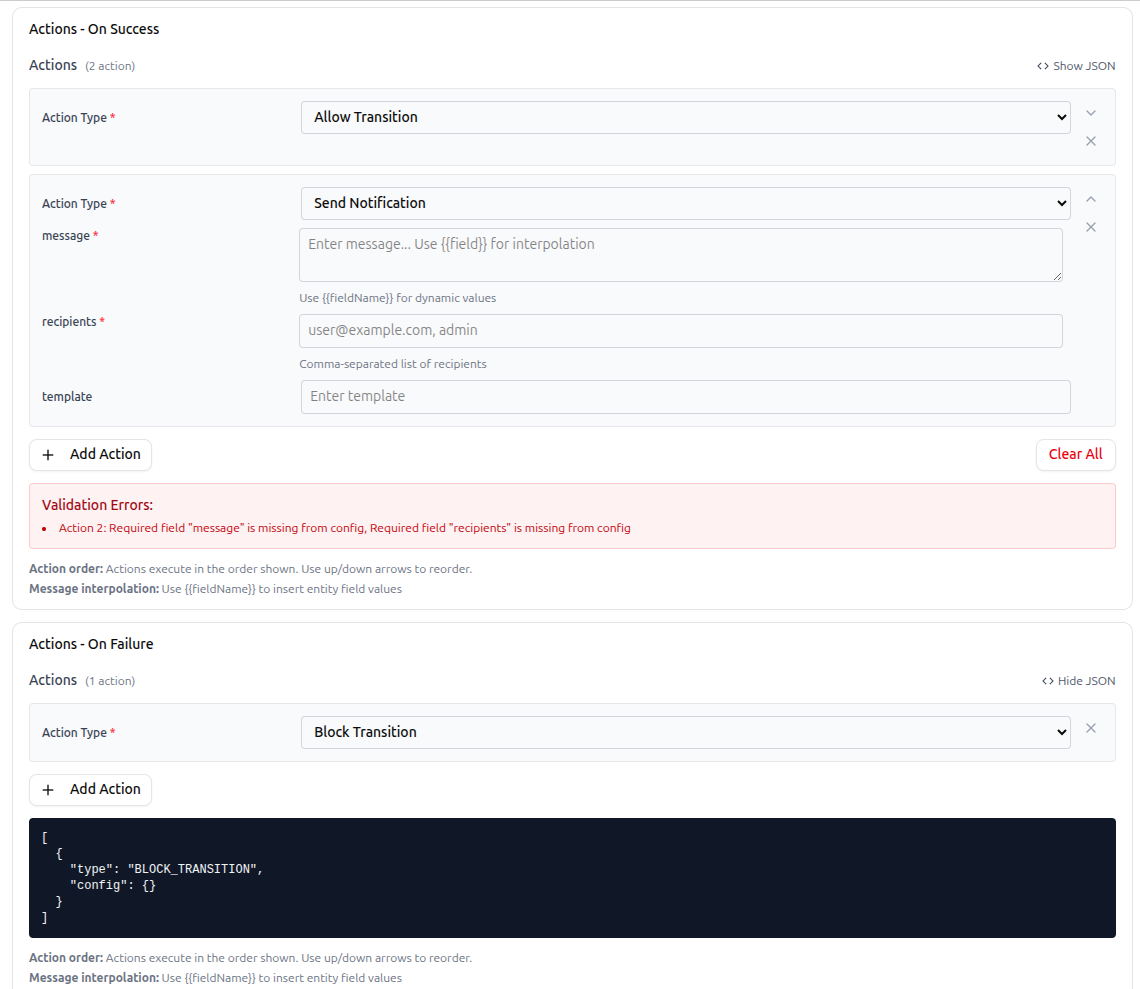 Action builder showing success and failure actions with configuration forms and reordering controls
Common Patterns
Approval Workflow:
Success: SET_FIELD status="PENDING_APPROVAL", NOTIFY approver, SHOW_INFO
Guard with Feedback:
Failure: BLOCK_TRANSITION, SHOW_ERROR, LOG error, NOTIFY admin
Audit Trail:
Success: LOG "{{operation}} by {{user.email}}", SET_FIELD lastModified
External Integration:
Success: LOG, CALL_WEBHOOK, EMIT_EVENT entity.synced
Best Practices
- Start simple (1-2 actions), add as needed
- Write clear, actionable messages
- Log important events for audit trail
- Place blocking actions early, external calls late
- Test interpolation and field paths
- Consider failure scenarios (webhooks, events)
- Avoid notification spam
Troubleshooting
| Issue | Check |
|---|---|
| Action not executing | Correct section (success/failure), conditions evaluating properly, execution logs |
| Interpolation failing | Field path syntax, field exists, execution logs for undefined values |
| Webhook failures | URL accessible, authentication, endpoint logs, JSON syntax |
| Field not setting | Field path correct, field writable, value type matches |
Next Steps
- Execution Logs - Monitor action execution
- API Reference - Execute rules programmatically